Sponsored Content by BenchlingReviewed by Ify IsiborAug 7 2026
Artificial Intelligence is transforming the documentation process. Benchling's Compose Agent assists users in converting any input, such as data files, photographs of whiteboards, or previous entries, into organized documentation in just a few minutes, allowing users to dedicate more time to scientific endeavors.
Image Credit: Shutterstock.com/goir
Features of Compose Agent
- Convert vendor protocols into templates that can be reused
- Organize lab meeting notes into structured experiment plans
- Revise experiments by implementing modifications
- Integrate data files into a single notebook entry
Suppose the user just concluded a lab meeting where the Principal Investigator outlined an experiment on the whiteboard. It is now essential to convert those notes into a formal notebook entry before the details slip the mind.
Users can acquire a new kit that comes with a 15-page protocol PDF, and the prospect of manually entering all those steps into Benchling makes them inclined to postpone it until tomorrow.
These tasks are not particularly challenging. The tasks are merely tedious. They add up to hours the user would prefer to dedicate to actual scientific work.
AI can help users move faster than ever. This includes the processes of compiling lab entries and completing necessary documentation. Benchling’s Compose Agent is specifically designed to address these situations – it drafts entries and templates from files, photographs, or prior entries.
This functionality guarantees consistency, maintains context, and generates structured data that the entire team can utilize. Below is an overview of how research teams are leveraging this tool:
1. Turn vendor protocols into reusable templates
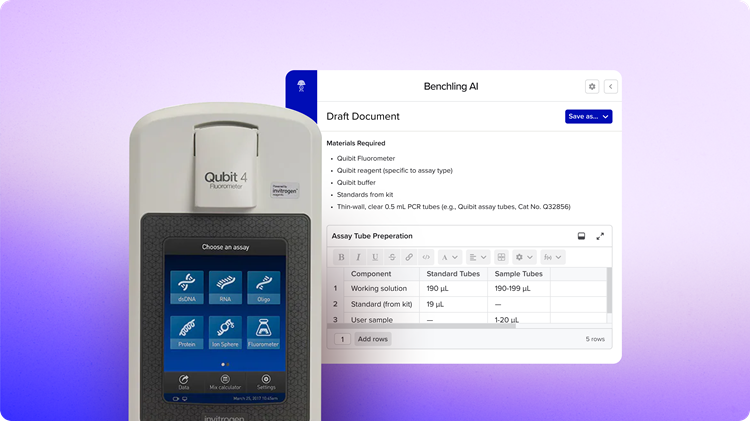
Image Credit: Benchling
The situation: Users can purchase a DNA quantification kit. Rather than manually entering the protocol into Benchling, users can simply upload the quick guide PDF into the AI chat.
In Benchling, Compose generates a structured entry that includes the materials list, detailed procedures, and a table for DNA quantification results – all set to be saved as a template for the team.
The AI payoff: Every laboratory routinely performs standard assays. By creating the template once, the user can ensure uniformity within the team, minimize errors from manual data entry, and preserve institutional knowledge. New team members can follow protocols accurately from their first day, and the lab gains the benefit of standardized, structured data that can be queried throughout the lab.
Example prompt:
“Draft an entry using the file attached. Include any Benchling result tables for Qubit.”
AI Pro tip: Benchling supports multiple file types, including PDF, Word docs, images, CSV, etc.
2. Structure lab meeting notes into experiment plans
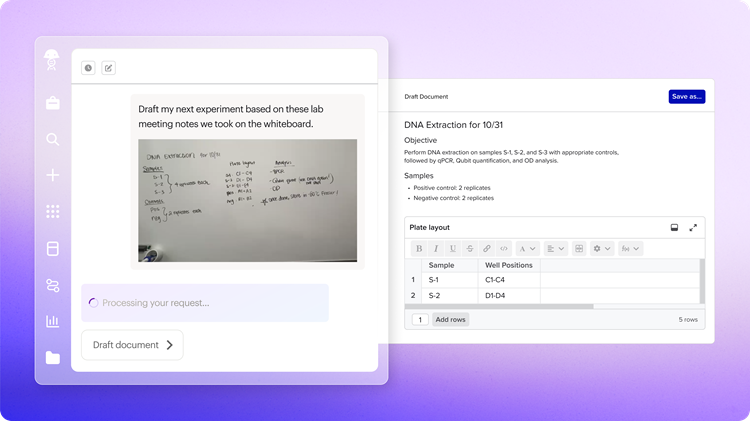
Image Credit: Benchling
The situation: During a laboratory meeting, the user illustrates a plate layout on the whiteboard, detailing treatment groups and sample organization for the Principal Investigator. Users take a photograph with the mobile device, upload it to the AI chat, and request the creation of an experiment entry.
In Benchling, the Compose feature can interpret the hand-drawn layout and produce a formatted entry that includes a proper 96-well plate map along with organized sample groups.
The AI payoff: Laboratory planning frequently occurs on whiteboards or in notebooks. Compose effectively connects the planning phase with documentation, ensuring that no details are overlooked. This is especially vital for intricate experiments that involve extensive sample organization, plate layouts, or multi-step protocols that must be accurately documented before the user starts.
Example prompt:
“Draft my next experiment based on these lab meeting notes we took on the whiteboard.”
AI Pro tip: If the whiteboard sketch is messy or incomplete, users can use the chat to refine it. For example, "Add sample IDs starting with CTRL-001".
3. Recreate experiments with modifications
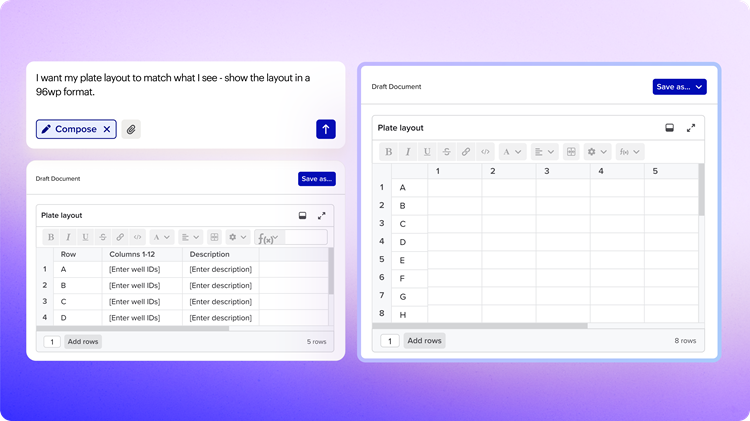
Image Credit: Benchling
The situation: Last month, users conducted a reporter gene assay involving 24 samples. Now, they are preparing to repeat the assay with 34 samples, including an additional control group. They can upload the relevant files into the AI chat and specify the modifications users wish to implement. The AI then produces a revised version of the experiment.
In Benchling, users can effortlessly insert the previous entry URL into Compose. This tool promptly generates the updated draft directly in Benchling within moments, allowing for further refinement if necessary.
The AI payoff: It enables the user to utilize the prior work to enhance scientific productivity. Rather than starting documentation from scratch each time, users can swiftly iterate on established methods, explore variations, refine protocols, and accelerate progress. This approach allows users to build on successful strategies while easily adjusting elements that need improvement.
Example prompt
“I’m running another fluorescence reporter gene assay on new samples. Create an entry based on the past experiment. [Link or attach past entry].”
AI Pro tip: Users can include result tables, adjust plate formats, or restructure sections with simple follow-up prompts like “Show the layout in a 96wp format.”
4. Import experiment notes and data files together
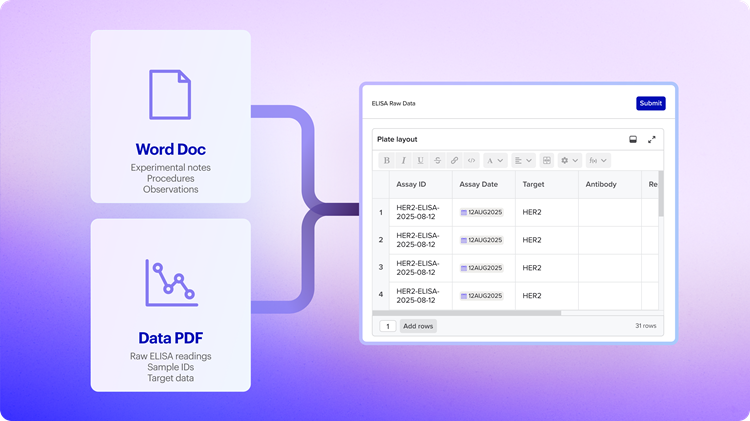
Image Credit: Benchling
During an ELISA experiment, users can document the procedure in a Word document and store the raw plate reader data in a PDF file. Rather than retyping this information into Benchling, users can conveniently upload both files to the AI chat, which will generate a new lab entry that incorporates the notes from both documents.
Within Benchling, the Compose agent is responsible for creating an entry that includes all procedural notes and automatically fills the ELISA results table with data extracted from the plate reader PDF. This process ensures that quality controls are upheld while preparing the data for subsequent analysis and insights.
The AI payoff: This method is especially beneficial for transcribing historical data files, deliverables from Contract Research Organizations (CROs), or experiments conducted prior to using Benchling. Instead of managing narrative and data separately, users can process both simultaneously. This strategy facilitates the seamless integration of external data into Benchling, ensuring that experimental data remains linked to its context – a crucial aspect for regulatory reviews, team transitions, and building upon previous work.
Example prompt:
“I have some experiment notes I captured in Word that I want to move into Benchling. Create a Benchling entry for me. Then log the results from my raw data file into an ELISA results table.”
Benchling AI Pro tip: Results are not auto-submitted – users will be asked to review and manually submit after saving the entry.
Documentation and administrative duties may not be the most enjoyable aspects of the role, yet they need not consume the entire afternoon either.
Compose takes care of transcription, formatting, and structuring. The result is time saved and uniformity within the team, a centralized repository for the laboratory knowledge, and data that can be easily retrieved when needed, even six months later.
The key point? Users can maintain control. Users can review the drafts, enhance them through chat, and choose what to retain. While Compose manages the labor-intensive tasks, the decisions remain the same.
About Benchling
Benchling makes biotech research and development faster and more collaborative. Biotechnology has the potential to solve humanity’s most pressing challenges, such as disease, renewable energy, clean water, and hunger. The brightest minds are working on these problems but they are equipped with archaic tools. We aspire to fix this and increase the rate of scientific output with a web-based platform that allows researchers to design and run experiments, analyze data, and share results.
Hundreds of thousands of scientists all around the world use Benchling to do research. Whether they are at the world’s largest companies, the top research universities, or working on a startup in a garage, scientists use Benchling for the same reason: to be empowered, not encumbered, by their tools.
Sponsored Content Policy: News-Medical.net publishes articles and related content that may be derived from sources where we have existing commercial relationships, provided such content adds value to the core editorial ethos of News-Medical.net, which is to educate and inform site visitors interested in medical research, science, medical devices and treatments.