21 CFR Part 11: Background
21 CFR Part 11, Electronic Records; Electronic Signatures, is a U.S. Food and Drug Administration (FDA) regulation that establishes criteria for the use of electronic records and electronic signatures in FDA-regulated activities. The final rule became effective on August 20, 1997, as industries were increasingly moving from traditional paper records toward electronic systems.
The regulation grew out of discussions between the FDA and regulated industries in the early 1990s about how electronic records and signatures could be used within environments governed by requirements such as current good manufacturing practice (cGMP).
A central concern was ensuring that electronic records could be considered trustworthy, reliable, and generally equivalent to paper records and handwritten signatures. Part 11 therefore established requirements and controls intended to protect the authenticity, integrity, and, when appropriate, confidentiality of electronic records and to help ensure that electronic signatures cannot be readily repudiated.
Although Part 11 is an FDA regulation, the principles it addresses have become increasingly relevant worldwide. Other regulatory frameworks and guidance, including EU GMP Annex 11 and guidance from the UK's Medicines and Healthcare products Regulatory Agency (MHRA), address similar expectations for computerized systems and data integrity.
Today, controls commonly associated with Part 11 - such as secure user access, audit trails, electronic signatures, record protection, and traceability - form part of a broader global approach to maintaining data integrity throughout the lifecycle of regulated electronic records.
Definitions
Understanding several key terms is important when applying 21 CFR Part 11. The following regulatory definitions are based on those provided in Part 11, with additional terminology relevant to Thermo Fisher Scientific software.
- Closed system: An environment in which system access is controlled by persons responsible for the content of the electronic records on the system.
- Open system: An environment in which system access is not controlled by persons responsible for the content of the electronic records on the system.
- Digital signature (DS): An electronic signature based on cryptographic methods of originator authentication that enables the identity of the signer and integrity of the data to be verified.
- Electronic record: Information in digital form - including text, graphics, data, audio, or images - that is created, modified, maintained, archived, retrieved, or distributed by a computer system.
- Electronic signature: A computer data compilation of symbols executed, adopted, or authorized by an individual as the legally binding equivalent of that individual's handwritten signature.
- Software application template files: Software files used to define or support an application or workflow, such as parameter files, custom methods, and kinetics methods.
Key Subparts of 21 CFR Part 11
21 CFR Part 11 is organized into three subparts:
- Subpart A - General Provisions: Defines the scope of the regulation, its implementation, and key terminology.
- Subpart B - Electronic Records: Establishes requirements for electronic records, including controls for closed and open systems, signature manifestations, and the linking of signatures to electronic records.
- Subpart C - Electronic Signatures: Establishes requirements and controls governing electronic signatures, including their use, identification, and authentication.
Together, these requirements provide a framework for establishing confidence that regulated electronic records and signatures remain reliable, traceable, and protected throughout their lifecycle.
Software
The SciVault 2 software package has been developed in accordance with the stringent guidelines of Thermo Fisher Scientific’s ISO 9001-certified product development process at its development and manufacturing facilities in Shanghai, China, and Madison, Wisconsin, USA.
Trained members from the facility’s different functional departments adhere to quality guidelines incorporating every aspect of development.
Each software development project commences with specifications in line with the customers’ specific needs. The company’s software designs are based on modular and object-oriented architecture, with software development practices adhering to its product-development process.
This process incorporates source-code control systems, change control procedures, and defect management. Comprehensive user documentation is also developed for every project.
The project test plan is followed to complete intensive regression testing and verification of the software. The qualification package can be employed to verify the accuracy and consistency of the spectrophotometer’s operation versus specified limits.
Developing a 21 CFR Part 11 compliance statement
A number of software tools are available to help ensure compliance with 21 CFR Part 11 in a laboratory setting. These include:
- Embedded spectral history tracking, including spectrophotometer parameters, user information, and any data manipulation information produced throughout the life of the data record or file
- System usernames and passwords
- An easy-to-use interface offering complete access control over software features
- An extensive range of software policies that allows program and file or data record operations to be controlled
- Comprehensive software use and event audit trails via a custom log, even at times when the software is not running
- Digital signatures with data, configurations, reports, method, and experiment files
- Direct on-board user management or indirect user management via the Windows® Active Directory
- Overwrite protection for data records
- The capacity to detect data tampering or changes via encrypted digital signatures
- API key generation for added data security when connecting to a LIMS
Windows security is embedded in the software structure when controlling these tools from a PC. This is set up through the Windows security features.
Instrument access can be controlled by using a combination of these features and software access privileges. When an electronic record is created, users are authenticated using either the Windows username and password or the local instrument username and password.
It is important that users responsible for maintaining system records take appropriate measures to ensure that the software operates in a closed system.
The sections below outline how the software tools described above can be used to meet each requirement of the 21 CFR Part 11 regulation.
It is important to remember that some sections of the regulation are solely the responsibility of the system’s owner, and it is not possible to directly provide tools for compliance with those sections.
Compliance with 21 CFR Part 11 extends beyond software implementation, however, and appropriate laboratory and computer procedures should be implemented to ensure that all phases of electronic record creation and management are carefully controlled.
Part 11 Subpart B: Electronic records
Subparts B and C of 21 CFR Part 11 include a number of key considerations.
§11.10 Controls for closed systems
“Persons who use closed systems to create, modify, maintain, or transmit electronic records shall employ procedures and controls designed to ensure the authenticity, integrity, and, when appropriate, the confidentiality of electronic records, and to ensure that the signer cannot repudiate the signed record as not genuine. Such procedures and controls shall include the following:
-
Validation of systems to ensure accuracy, reliability, consistent intended performance, and the ability to discern invalid or altered records.”
The system owner should develop an appropriate validation protocol. Thermo Fisher Scientific offers a range of products and services suitable for laboratory qualification, providing the tools, documentation, and certification services required to streamline system qualification efforts.
The software’s digital signature option enables detection of invalid or altered records. Application template files, result data, and audit log report files can be digitally signed to ensure the record’s validity. The software can detect invalid or altered records by checking for the presence of an appropriate digital signature.
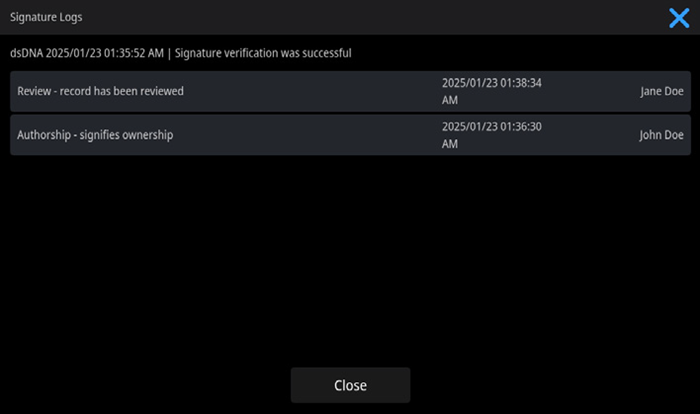
Image Credit: Thermo Fisher Scientific - UV-Vis Spectroscopy
-
“The ability to generate accurate and complete copies of records in both human readable and electronic form suitable for inspection, review, and copying by the agency. Persons should contact the agency if there are any questions regarding the ability of the agency to perform such review and copying of the electronic records.”
In-depth information about the instrument and experiment is stored in a non-editable, file-embedded spectral history when data is collected. Information about the processing operation is noted in the data’s history (Signature Logs) if the data is later post-processed.
Information about digital signatures and the system user is also stored. Users can view and print the data files and their history at any time, but it is important to remember that the system owner is responsible for the format used to save data.
The SciVault 2 software also provides a detailed database of information, including all information listed above. Users can view and print data records and history at any time using the Audit Logs application.
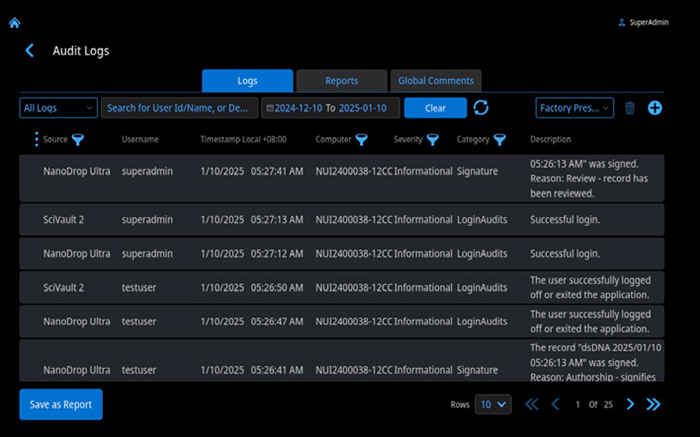
Image Credit: Thermo Fisher Scientific - UV-Vis Spectroscopy
-
“Protection of records to enable their accurate and ready retrieval throughout the records retention period.”
Data created by the software can be passed directly to a secure server for storage. The IT group or system owner must determine how the files will be archived and who will be permitted access to these records.
The SciVault 2 software is able to store data directly in a database located on a secure server. Other applications offer secure data file storage directly to a secure server.
-
“Limiting access to authorized individuals.”
Access to the system is controlled by either local-instrument-created or Windows secure logins. The NanoDrop Ultra PC control software must be installed on computers running Windows, and users must be added to an available role that can be configured to allow access to the software via the User Privileges application.
System administrators can restrict system access to authorized users using the login feature on the local instrument or on a PC running Windows.
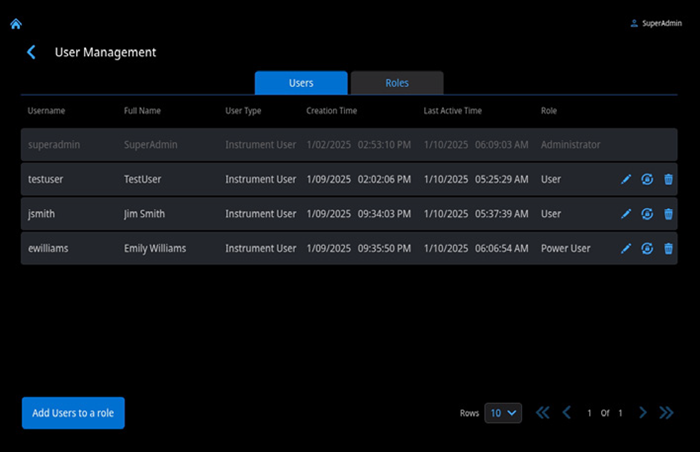
Image Credit: Thermo Fisher Scientific - UV-Vis Spectroscopy
Users must log in using their username and password to gain access to the software. This would be their Windows username and password if operating the system through a PC. The user is allocated a unique username and a private password to ensure full security.
Each user's role can be configured by the system administrator to restrict software access to only the programs the specific user requires.
A Windows system must be configured with a secure file system to grant users individual read, write, and delete access. Access privileges to data records, features, security policies, and signature meanings are set via the User Privileges.
File operations performed on a computer external to the software application remain the responsibility of the system owner, however.
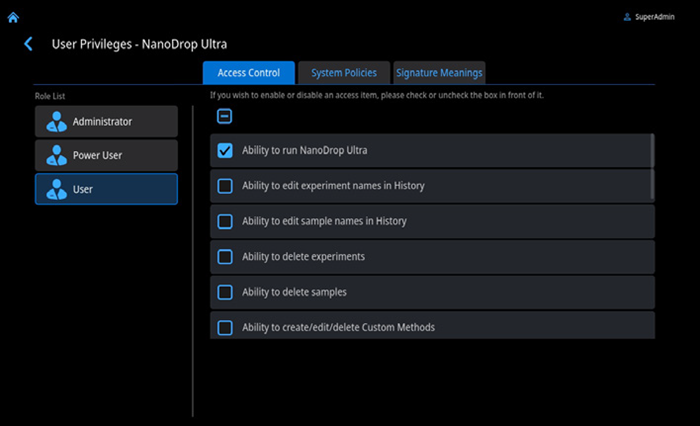
Image Credit: Thermo Fisher Scientific - UV-Vis Spectroscopy
-
“Use of secure, computer-generated, time-stamped audit trails to independently record the date and time of operator entries and action[s] that create, modify, or delete electronic records. Record changes shall not obscure previously recorded information. Such audit trail documentation shall be retained for a period at least as long as that required for the subject electronic records and shall be available for agency review and copying.”
Comprehensive date and time, operator, experiment, and instrument information is stored in a non-editable, file- or database-embedded spectral history when data is collected. The SciVault 2 software also stores this data in its own database.
Operational qualification of the SciVault 2 software is performed using the SciVault 2 OQ. SciVault 2 logs any attempt to create, modify, or delete any TFS records on the system. This history provides users with an internal record of all post-creation data manipulations for any data file.
-
“Use of operational system checks to enforce permitted sequencing of steps and events, as appropriate.”
Step sequencing and events can be enforced for every aspect of data collection, processing, and archiving. The software can create step files that specify and sequence the entire process, including parameter collection, data collection, final formats, post-processing operations, and data archiving.
The software can also be configured to only allow users to access files in a specific network location.
Windows user access privileges are extended to the NanoDrop Ultra software and User Privileges application when operating from a PC. Users with the administrator role are able to control each individual user’s software access privileges.
The IT group or system administrator should establish access failure criteria. The Windows administrator must configure these security features to ensure that only authorized individuals have access to the system.
The software notifies the user if the sequence in the test data has been altered. This causes the signature to be invalidated, meaning that the test will not run.
-
“Use of authority checks to ensure that only authorized individuals can use the system, electronically sign a record, access the operation or computer system input or output device, alter a record, or perform the operation at hand.”
The IT group or system administrator must define access failure criteria. It is the Windows administrator’s responsibility to set these security features to ensure that only authorized individuals can access the system and its data records.
-
“Use of device (e.g., terminal) checks to determine, as appropriate, the validity of data input or operational instruction.”
The system’s software application template files and firmware determine the instrument’s input validity or operational instruction. The system firmware is an IQ-qualified standard component, meaning that it can only be updated by a certified and trained Thermo Scientific service representative.
User-access policies defined by the system administrator dictate access to change software application template files. Administrators can save software application template files to a secure Windows file system to prevent unauthorized users from altering system operational parameters.
-
“Determination that persons who develop, maintain, or use electronic record/electronic signature systems have the education, training, and experience to perform their assigned tasks.”
Thermo Fisher Scientific’s system developers are highly trained, with training records stored according to the company’s internal training procedure. Each developer has a training matrix and individual training records. Thermo Fisher Scientific is ISO 9001-certified and closely follows these guidelines when developing every product.
The company’s service representatives are trained to maintain and service its instruments and software, recertifying their training on its qualification and security software every two years. A training matrix is also created and maintained for service representatives.
It is the system owner’s responsibility to ensure that those developing, maintaining, or using electronic records and electronic signature systems on-site have the appropriate training, expertise, and experience to perform their assigned task.
-
“The establishment of, and adherence to, written policies that hold individuals accountable and responsible for actions initiated under their electronic signatures, in order to deter record and signature falsification.”
The system owner must establish written policies to deter falsification or fraud, holding individuals accountable for any actions performed and signed using electronic signatures.
k1. “Use of appropriate controls over systems documentation including: Adequate controls over the distribution of, access to, and use of documentation for system operation and maintenance.”
The software and instrument are supplied with documentation for their operation and maintenance. This documentation can be employed in the development of standard operating procedures (SOPs), but it is the system owner’s responsibility to control system documentation.
k2. “Use of appropriate controls over systems documentation including: Revision and change control procedures to maintain an audit trail that documents time-sequenced development and modification of systems documentation.”
Version information is included in the documentation, and this can be incorporated into the system owner’s documentation control system. Software and firmware version numbers are available by selecting ‘About’ in the ‘Help’ menu. A change control protocol should also be implemented for system documentation.
§11.30 Controls for open systems
“Persons who use open systems to create, modify, maintain, or transmit electronic records shall employ procedures and controls designed to ensure the authenticity, integrity, and, as appropriate, the confidentiality of electronic records from the point of their creation to the point of their receipt.”
“Such procedures and controls shall include those identified in § 11.10, as appropriate, and additional measures such as document encryption and use of appropriate digital signature standards to ensure, as necessary under the circumstances, record authenticity, integrity, and confidentiality.”
A closed system must be used to implement the software, but data encryption is employed in the database. Windows security is embedded in the software, with the Windows security feature used to set up software security.
A combination of the Windows login and password, and password re-verification, is required when a user starts the software. This is essential for controlling access to the software and instrument.
Compliance with 21 CFR Part 11 can be achieved in relation to a closed system by following these guidelines.
Data encryption is employed, but it is advisable to store the data on a secure server to ensure that only authorized users can access data, in line with their respective privileges. These privileges must be controlled by a unique username and password combination.
If it is necessary to achieve compliance on an open system, anyone responsible for the maintenance of system records must implement appropriate measures to ensure that the software is compliant.
§11.50 Signature manifestations
-
“Signed electronic records shall contain information associated with the signing that clearly indicates all of the following:
-
-
The printed name of the signer;
-
The date and time when the signature was executed; and
-
The meaning (such as review, approval, responsibility, or authorship) associated with the signature.”
As well as the signature itself, all digital signatures produced by the software must contain the information specified by the regulations.
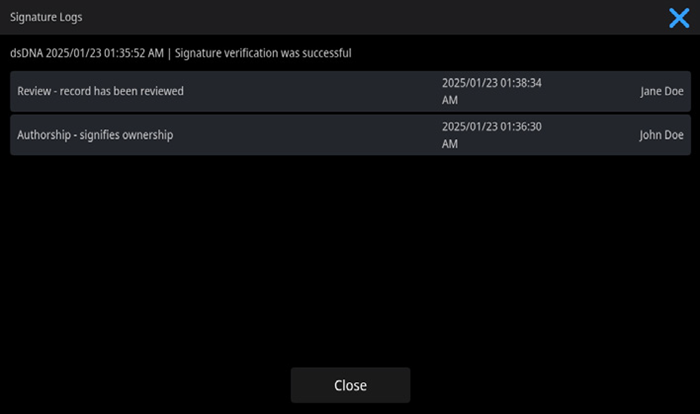
Image Credit: Thermo Fisher Scientific - UV-Vis Spectroscopy
-
“The items identified in paragraphs (a)(1), (a)(2), and (a)(3) of this section shall be subject to the same controls as for electronic records and shall be included as part of any human readable form of the electronic record (such as electronic display or printout).”
The software’s digital signatures are embedded in the electronic record, meaning they are subject to the same controls as the record. The signature is included in the electronic record’s human-readable and printed form.
§11.70 Signature/record linking
“Electronic signatures and handwritten signatures executed to electronic records shall be linked to their respective electronic records to ensure that the signatures cannot be excised, copied, or otherwise transferred to falsify an electronic record by ordinary means.”
The digital signature is stored in a database with the data or report that it relates to and signs. The software’s digital signatures are all directly linked to the electronic record, and this can be checked to reveal an invalid electronic record.
Subpart C: Electronic signatures
§11.100 General requirements for electronic signatures
-
“Each electronic signature shall be unique to one individual and shall not be reused or reassigned to anyone else.”
It is important that the system owner’s policy for the assignment of Windows user IDs and passwords or local instrument user IDs and passwords is compliant with this requirement.
Assigning a unique username to each individual is key, as well as avoiding the reuse or reassignment of usernames. The digital signature produced by the software will be unique if the usernames are unique for all individuals with access to the system.
-
“Before an organization establishes, assigns, certifies, or otherwise sanctions an individual’s electronic signature, or any element of such signature, the organization shall verify the identity of the individual.”
The system owner should implement appropriate measures to ensure the identity of all individuals potentially involved in applying electronic signatures to records.
-
“Persons using electronic signatures shall, prior to or at the time of such use, certify to the agency that the electronic signatures in their system, used on or after August 20, 1997, are intended to be the legally binding equivalent of traditional handwritten signatures.
-
The certification shall be submitted in paper form and signed with a traditional handwritten signature, to the Office of Regional Operations (HFC–100), 5600 Fishers Lane, Rockville, MD 20857.
-
Persons using electronic signatures shall, upon agency request, provide additional certification or testimony that a specific electronic signature is the legally binding equivalent of the signer’s handwritten signature.”
Any organization using an electronic signature must make this signature legally binding by submitting a form and letter to the FDA.
§11.200 Electronic signature components and controls
-
“Electronic signatures not based upon biometrics shall:
-
- Employ at least two distinct identification components such as an identification code and password.
-
- When an individual executes a series of signings during a single, continuous period of controlled system access, the first signing shall be executed using all electronic signature components; subsequent signings shall be executed using at least one electronic signature component that is only executable by, and designed to be used only by, the individual.
- When an individual executes one or more signings not performed during a single, continuous period of controlled system access, each signing shall be executed using all of the electronic signature components.
- Be used only by their genuine owner; and
- Be administered and executed to ensure that attempted use of an individual’s electronic signature by anyone other than its genuine owner requires collaboration of two or more individuals.”
The software’s digital signatures are based on the user’s login ID and their user-generated password. The software generates the digital signature in the system, with a unique combination of signature components for each user, provided that the requirements outlined in 11.100 (a) are met.
The user logged in to the Windows session or local instrument control software must enter their password at the time of system use to facilitate software signing. The system owner and administrator should implement a protocol for using electronic signatures as described in requirements (2) and (3).
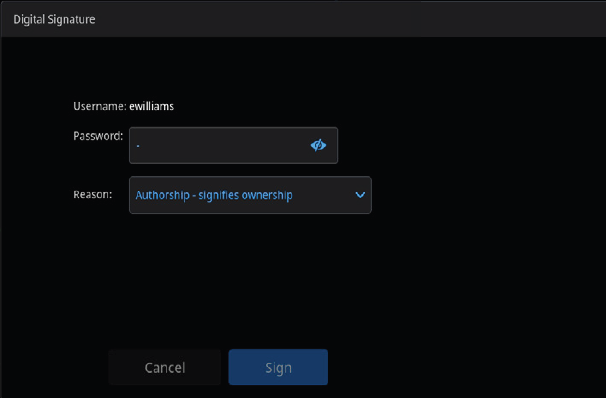
Image Credit: Thermo Fisher Scientific - UV-Vis Spectroscopy
-
“Electronic signatures based on biometrics shall be designed to ensure that they cannot be used by anyone other than their genuine owners.”
Rather than biometrics, Thermo Fisher Scientific’s software uses digital signatures based on the combination of a username and password. Because of this, this section is not applicable when using the NanoDrop™ software.
§11.300 Controls for identification codes and passwords
“Persons who use electronic signatures based upon use of identification codes in combination with passwords shall employ controls to ensure their security and integrity. Such controls shall include:
-
Maintaining the uniqueness of each combined identification code and password, such that no two individuals have the same combination of identification code and password.”
The IT group or system administrator must ensure that each individual’s combination of ID code and password is unique. Issuing each user a unique login identification is key to accomplishing this.
-
“Ensuring that identification code and password issuances are periodically checked, recalled, or revised (e.g., to cover such events as password aging).
-
Following loss management procedures to electronically deauthorize lost, stolen, missing, or otherwise potentially compromised tokens, cards, and other devices that bear or generate identification code or password information, and to issue temporary or permanent replacements using suitable, rigorous controls.
-
Use of transaction safeguards to prevent unauthorized use of passwords and/or identification codes, and to detect and report in an immediate and urgent manner any attempts at their unauthorized use to the system security unit, and, as appropriate, to organizational management.”
Windows security features streamline the process of periodically checking, recalling, and revising usernames and passwords. The Windows operating system also features transaction safeguards designed to prevent unauthorized access.
Many system administrators opt to limit the number of failed login attempts and implement a password aging procedure to document and control them.
Windows help files offer information on activating system safeguards. It is also important that the system administrator implements a procedure for checking ID codes and passwords, as well as for managing password loss.
-
“Initial and periodic testing of devices, such as tokens or cards, that bear or generate identification code or password information to ensure that they function properly and have not been altered in an unauthorized manner.”
Thermo Fisher Scientific’s software does not use cards or tokens to generate identification codes, meaning that this particular requirement is not applicable.
Summary
The information provided here is based on Thermo Fisher Scientific’s interpretation of the regulations, as well as in-depth consultation with experts in the field.
The company’s software and its digital signature option should be implemented with the user’s own procedures and controls, in accordance with an FDA-compliant process.
About Thermo Fisher Scientific - UV-Vis Spectroscopy
UV-Vis Spectrometers overview
Scientists can count on our broad range of ultraviolet (UV) and visible (Vis) spectrophotometers to deliver reliable, accurate data. The Thermo Scientific SPECTRONIC 200, GENESYS, and Evolution product lines are designed to streamline measurements, providing consistent, high-quality results, time after time. Additionally, the innovative Thermo Scientific NanoDrop microvolume family of instruments has been helping scientists accelerate the pace of discovery for over 20 years. From classroom teaching to routine measurements to discovery of the next scientific breakthrough, our line of spectrophotometers is designed to fit into any modern laboratory.
Sponsored Content Policy: News-Medical.net publishes articles and related content that may be derived from sources where we have existing commercial relationships, provided such content adds value to the core editorial ethos of News-Medical.net, which is to educate and inform site visitors interested in medical research, science, medical devices and treatments.