The NanoDrop™ Ultra Microvolume UV-Vis Spectrophotometer from Thermo Scientific™ features an optional recipe calculator designed to enable seamless volume calculations for downstream qPCR and RT-qPCR use.
The NanoDrop Ultra software automatically calculates sample volume based on the selected qPCR kit and the defined final template concentration.
The software’s Kit Editor includes predefined values for popular kits, including the Applied Biosystems™ TaqMan™ and TaqPath™ Master Mixes. Custom kits can also be added as required.
The recipe calculator is available for the dsDNA and RNA applications. The dsDNA application is most suitable where purified cDNA is quantified prior to qPCR.
The Kit Editor
The Kit Editor option is found under ‘Settings’ in the software. The editor includes predefined options for popular master mix assays (Figure 1), with each assay featuring columns for ‘Total Reaction Volume’, ‘Primer/Probe’ and ‘Master Mix Volume’ in microliter units.
Total Reaction Volume signifies the total volume in each reaction well. This value is defined by the master mix protocol, which includes master mix, water, primers, template, and probe(s).
Primer/Probe and Master Mix Volume represent the combined volume of the primers/probe(s) and the master mix added to each individual reaction well. This column’s value is the sum of the volumes for the master mix and primers/probe(s).
Final Template Concentration represents the concentration of the target nucleic acid following mixing in the reaction well. It can be edited in the predefined options in the measurement screen or by selecting the three-dot icon in the Kit Editor.
If the predefined options are not applicable, it is possible to add a custom kit to the Kit Editor by selecting the ‘+ Kit’ button.
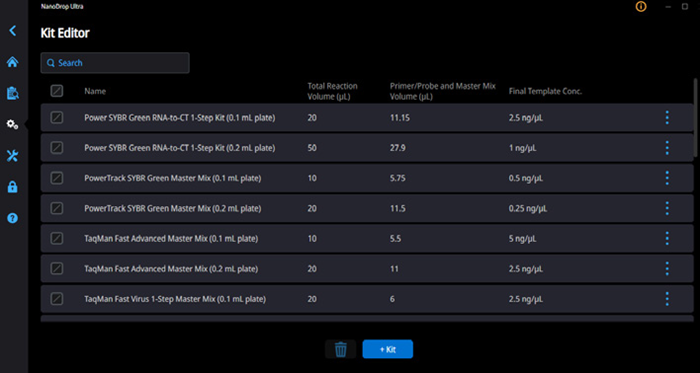
Figure 1. Kit Editor includes a predefined list of qPCR master mix kits including kit-specific volumes. Select the “+ Kit” button to add a custom kit. Image Credit: Thermo Fisher Scientific - UV-Vis Spectroscopy
The recipe calculator can be enabled by toggling on and selecting a kit in the experiment settings (Figure 2). The resulting list contains all kits included in the Kit Editor. Results and calculations are included in the report table when enabled, or these can be accessed by selecting the qPCR Kit Data icon in the measurement screen.
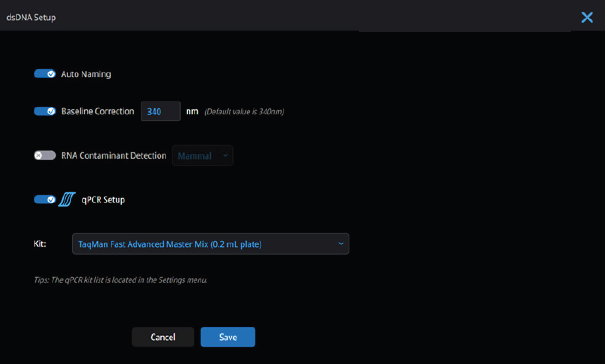
Figure 2. Recipe calculator (qPCR Setup) is enabled in the experiment settings. Image Credit: Thermo Fisher Scientific - UV-Vis Spectroscopy
Understanding the results
Selecting the qPCR Kit Data icon provides a summary of the required calculations for the specific qPCR reaction (Figure 3). This summary includes two sections: ‘Dilution Required’ and ‘Kit Reaction’.
A preliminary dilution may be required if the measured nucleic acid is highly concentrated. This occurs before adding the nucleic acid to the qPCR reaction mix. Under these circumstances, the Dilution Required section will show recommended volumes for the stock nucleic acid and a diluent to create a working concentration of diluted nucleic acid for the qPCR reaction.
If the Dilution Required section is empty, no dilution is needed prior to adding the stock nucleic acid to the reaction well.
The Kit Reaction section includes three columns: ‘Nucleic Acid Volume (µL)’, ‘Water Volume (µL)’, and ‘Final Template Concentration’.
Nucleic Acid Volume indicates the volume of nucleic acid sample to add to the qPCR reaction well to achieve the specified concentration. This concentration is defined in the Final Template Concentration column.
It is important to note that the diluted nucleic acid from the Dilution Required section will be used for the Nucleic Acid Volume column if a dilution was necessary, while the stock nucleic acid will be employed if no dilution was necessary.
The Water Volume column details how much water should be added to achieve the Total Reaction Volume defined in the Kit Editor (Figure 1).
The Final Template Concentration column details the target nucleic acid concentration after adding all reaction components, such as master mix and water. It is possible to modify this concentration, which will update the calculated volumes.
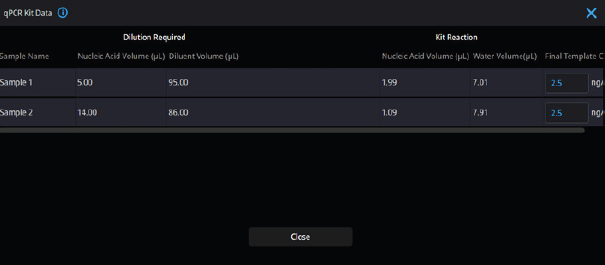
Figure 3. Example of results provided by the qPCR Kit Data calculations. The blue information icon on the top left of the table next to “qPCR Kit Data” provides guidance on how to read the two sections for quick and easy access. Image Credit: Thermo Fisher Scientific - UV-Vis Spectroscopy
It is also possible to add calculated qPCR recipe volumes to the report, which can be saved electronically in .pdf and printed in settings where qPCR preparations are performed away from the NanoDrop Ultra instrument.
Figure 4 outlines reported values that can be selected to ensure that the same information from the qPCR Kit Data details (Figure 3) also appears in the report, including ‘Dilution’ and ‘Rxn,’ which correspond to the preliminary dilution and the kit reaction’s recommended volumes, respectively.
The sample dilution ratio represents the ratio of nucleic acid to diluent in instances where a preliminary dilution is required prior to the addition of nucleic acid to the qPCR reaction well.
Guidance on dilution volumes is available in the recipe calculator, but the sample dilution ratio can be used to scale up or down volumes while still maintaining the target final template concentration in cases where different volumes are required.
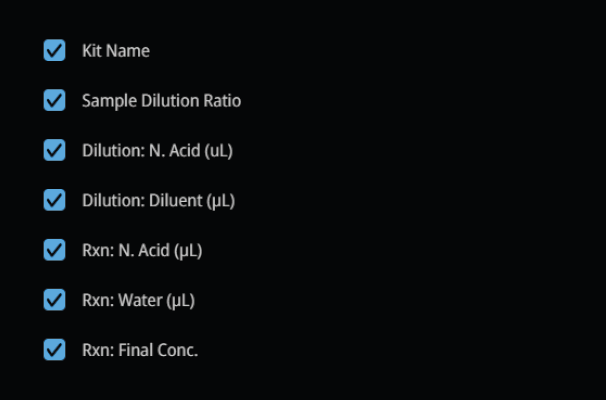
Figure 4. Reported values to select to include qPCR recipe details in the report, which can be saved as a .pdf file. Image Credit: Thermo Fisher Scientific - UV-Vis Spectroscopy
Conclusion
The NanoDrop Ultra spectrophotometer’s recipe calculator simplifies the necessary calculations for downstream RT-qPCR or qPCR reactions. The instrument’s built-in Kit Editor includes a number of predefined master mix kits with the flexibility to add a custom kit with parameters matching a user-defined kit.
The recipe calculator enhances efficiency and removes the need for error-prone manual calculations by providing recommended dilutions and volumes to meet specific nucleic acid concentrations. It also eliminates the need for calculations performed outside the laboratory.
About Thermo Fisher Scientific - UV-Vis Spectroscopy
UV-Vis Spectrometers overview
Scientists can count on our broad range of ultraviolet (UV) and visible (Vis) spectrophotometers to deliver reliable, accurate data. The Thermo Scientific SPECTRONIC 200, GENESYS, and Evolution product lines are designed to streamline measurements, providing consistent, high-quality results, time after time. Additionally, the innovative Thermo Scientific NanoDrop microvolume family of instruments has been helping scientists accelerate the pace of discovery for over 20 years. From classroom teaching to routine measurements to discovery of the next scientific breakthrough, our line of spectrophotometers is designed to fit into any modern laboratory.
Sponsored Content Policy: News-Medical.net publishes articles and related content that may be derived from sources where we have existing commercial relationships, provided such content adds value to the core editorial ethos of News-Medical.net, which is to educate and inform site visitors interested in medical research, science, medical devices and treatments.